|
|
Installing AJAX Control Toolkit 4 in Visual Studio 2010
<div class="post"><div class="postsub">In this tutorial I’ll show you how to install AJAX Control toolkit step by step:
You can download AJAX Toolkit .NET 4 “Apr 12 2010” released before 4 days, from http://ajaxcontroltoolkit.codeplex.com/releases/view/43475#DownloadId=116534, Once downloaded, extract AjaxControlToolkit.Binary.NET4 on your computer, then extract AjaxControlToolkitSampleSite.
after that you need to open Visual Studio 2010, So we will add the toolkit to the toolbox. To do that press right-click in an empty space on your toolbox, then choose Add Tab.
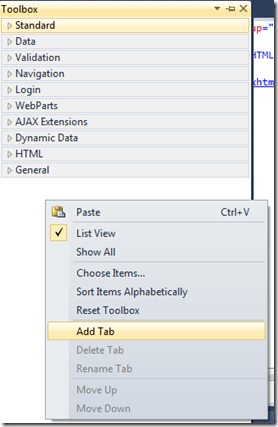
You can rename the new tab to be “Ajax Toolkit” for example :

Then when it is added, right-click under the tab and select Choose Items:
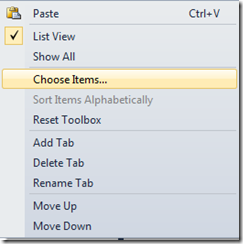
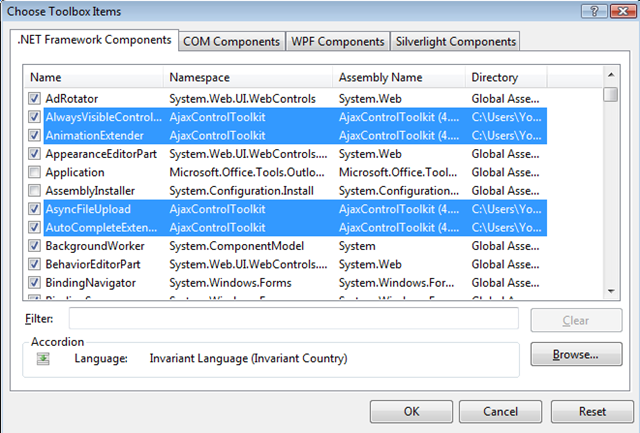
When the dialog box appears Choose .NET Framework Components tab then click Browse button and find AjaxControlToolkit folder that you installed the AJAX Control Toolkit. In that directory you will find a sub-directory called AjaxControlToolkitSampleSite, and under that folder you will find bin Folder, in this folder choose AjaxControlToolkit.DLL which 5.59 MB.
The result of these steps, Visual Studio will load all the controls from the DLL file and by default it will be checked in this list:
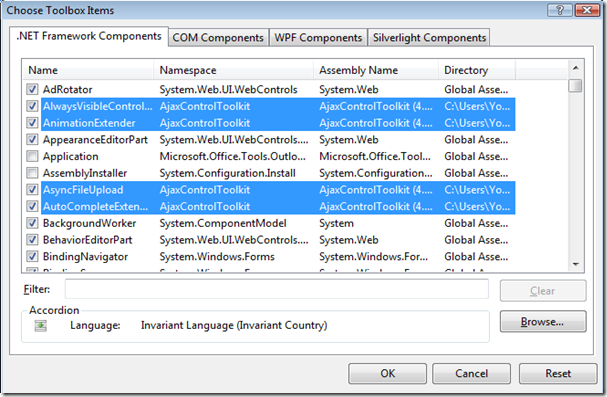
To submit your steps press OK button.
Ultimately,you can find the components in your Toolbox and you can use it.

Happy programming! |
|
 京ICP备14020293号-2
本网站内容均收集于互联网,如有问题请联系QQ:389897944予以删除
京ICP备14020293号-2
本网站内容均收集于互联网,如有问题请联系QQ:389897944予以删除


 窥视卡
窥视卡 雷达卡
雷达卡


 楼主
楼主


 提升卡
提升卡 置顶卡
置顶卡 沉默卡
沉默卡 喧嚣卡
喧嚣卡 变色卡
变色卡 千斤顶
千斤顶 显身卡
显身卡