|
|

作者: 麒麟 发表于 2010-07-18 19:58 原文链接 阅读: 631 评论: 9
在Asp.net MVC中,我们能非常方便的使用Ajax。这篇文章将介绍三种Ajax使用的方式,分别为原始的Ajax调用、Jquery、Ajax Helper。
首先看一下原始的Ajax的调用的
在Asp.net MVC中添加一个custom_ajax.js,加入下面使用ajax的脚本代码
function getXmlHttpRequest() { var xhr; //check for IE implementation(s) if (typeof ActiveXObject != 'undefined') { try { xhr = new ActiveXObject("Msxml2.XMLHTTP"); } catch (e) { xhr = new ActiveXObject("Microsoft.XMLHTTP"); } } else if (XMLHttpRequest) { //this works for Firefox, Safari, Opera xhr = new XMLHttpRequest(); } else { alert("对不起,你的浏览器不支持ajax"); } return xhr;} function getMessage() { //get our xml http request object var xhr = getXmlHttpRequest(); //prepare the request xhr.open("GET", "get_message.html", true) //setup the callback function xhr.onreadystatechange = function() { //readyState 4 means we're done if(xhr.readyState != 4) return; //populate the page with the result document.getElementById('result').innerHTML = xhr.responseText; }; //fire our request xhr.send(null);}在View中引入此脚本,并添加触发的代码:
<asp:Content ID="Content1" ContentPlaceHolderID="TitleContent" runat="server"> 第一种方式</asp:Content><asp:Content ID="Content3" ContentPlaceHolderID="headContent" runat="server"> <script src="http://www.cnblogs.com/Scripts/custom_ajax.js" type="text/javascript"></script></asp:Content><asp:Content ID="Content2" ContentPlaceHolderID="MainContent" runat="server"> <p><strong>点击按钮处罚一个Ajax请求: </strong> <button type="button" onclick="getMessage()">Get the Message</button> </p> <div id="result"></div></asp:Content>效果如下:触发之前: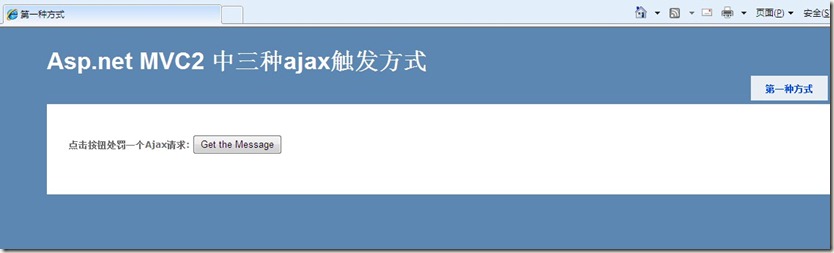 触发之后: 触发之后: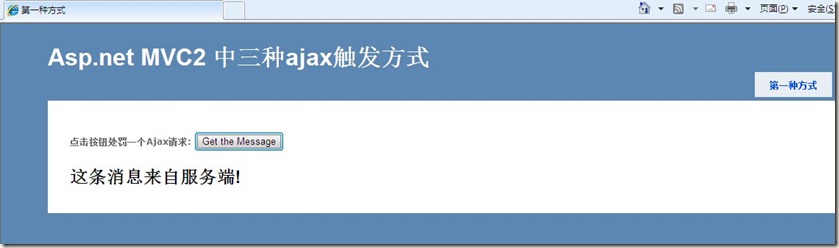 第二种方式,利用Jquery:这里实现一个最简单的留言板,数据存储在一个List<string>中。在View中引用Jquery: <script src="http://www.cnblogs.com/Scripts/jquery-1.4.1.min.js" type="text/javascript"></script> 第二种方式,利用Jquery:这里实现一个最简单的留言板,数据存储在一个List<string>中。在View中引用Jquery: <script src="http://www.cnblogs.com/Scripts/jquery-1.4.1.min.js" type="text/javascript"></script>
添加下面脚本:
<script type="text/javascript"> //execute when the DOM has been loaded $(document).ready(function () { //wire up to the form submit event $("form.hijax").submit(function (event) { event.preventDefault(); //prevent the actual form post hijack(this, update_sessions, "html"); }); }); function hijack(form, callback, format) { $("#indicator").show(); $.ajax({ url: form.action, type: form.method, dataType: format, data: $(form).serialize(), completed: $("#indicator").hide(), success: callback }); } function update_sessions(result) { //clear the form $("form.hijax")[0].reset(); $("#comments").append(result); } </script>
创建控制器:public class CommentController : Controller{ private IList<string> _comments = new List<string>(); public ActionResult Index() { return View(_comments); } public ActionResult IndexAjaxHelp() { return View(_comments); } public ActionResult AddComment(string comment) { _comments.Add("<li>" + comment + "</li>"); return Content(string.Join("\n", _comments.ToArray())); }}创建View表单: <h4>Comments</h4> <ul id="comments"> </ul> <% using (Html.BeginForm("AddComment","Comment",FormMethod.Post,new {@class="hijax"})) { %> <%= Html.TextArea("Comment", new{rows=5, cols=50}) %> <button type="submit">Add Comment</button> <span id="indicator" style="display:none"><img src="http://www.cnblogs.com/content/load.gif" alt="loading..." /></span> <% } %>效果: 第三种方式:Ajax Helper。将最简单的留言板修改成Ajax Helper的方式。1、首先了解一下Ajax Helper下面四种方法。 第三种方式:Ajax Helper。将最简单的留言板修改成Ajax Helper的方式。1、首先了解一下Ajax Helper下面四种方法。
a、Ajax.ActionLink():它将渲染成一个超链接的标签,类似于Html.ActionLink()。当它被点击之后,将获取新的内容并将它插入到HTML页面中。
b、Ajax.BeginForm():它将渲染成一个HTML的Form表单,类似于Html.BeginForm()。当它提交之后,将获取新的内容并将它插入到HTML页面中。
c、Ajax.RouteLink():Ajax.RouteLink()类似于Ajax.ActionLink()。不过它可以根据任意的routing参数生成URL,不必包含调用的action。使用最多的场景是自定义的IController,里面没有action。
d、Ajax.BeginRouteForm():同样Ajax.BeginRouteForm()类似于Ajax.BeginForm()。这个Ajax等同于Html.RouteLink()。
这个例子中使用Ajax.BeginForm(),下面具体了解Ajax.BeginForm()的参数。看下面代码
<% using (Ajax.BeginForm("AddComment", new AjaxOptions { HttpMethod = "POST", UpdateTargetId = "comments", InsertionMode = InsertionMode.InsertAfter })) { %> actionName:AddComment(action的名字)
controllerName:CommentController(Controller的名字)
ajaxOptions:
HttpMethod:Ajax的请求方式,这里为POST
UpdateTargetId :Ajax请求的结果显示的标签的ID,这里为comments
InsertionMode:将Ajax结果插入页面的方式,这里将ajax的结果放置到comments的后面
2、实现:
首先要在View中添加下面两个脚本文件:
<script src="http://www.cnblogs.com/Scripts/MicrosoftAjax.js" type="text/javascript"></script> <script src="http://www.cnblogs.com/Scripts/MicrosoftMvcAjax.js" type="text/javascript"></script> 定义表单:
<h4>Comments</h4> <ul id="comments"> </ul> <% using (Ajax.BeginForm("AddComment", new AjaxOptions { HttpMethod = "POST", UpdateTargetId = "comments", InsertionMode = InsertionMode.InsertAfter })) { %> <%= Html.TextArea("Comment", new{rows=5, cols=50}) %> <button type="submit">Add Comment</button> <% } %> 这样就行了,我们发现比用Jquery方便很多,但是使用Jquery将灵活很多。
3、效果:和第二种一样。
总结:本文非常的简单,在asp.net mvc中实现了3中ajax的调用方式。推荐使用Jquery和Ajax Helper这两种。Ajax Helper使用非常简单,Jquery比较灵活。
参考:
ASP.NET MVC 2 In Action
Pro ASP.NET MVC 2 Framework, Second Edition
 评论: 9 查看评论 发表评论 评论: 9 查看评论 发表评论
百度期待您的加盟
最新新闻:
· 微软不为外界所知的十件趣事(2010-07-18 22:58)
· 中国第2季搜索引擎市场规模达26亿 百度破70%(2010-07-18 22:54)
· Facebook用户数下周达5亿 邀请用户共享故事(2010-07-18 22:49)
· 开源的可视化编辑器 KindEditor 3.5.1 发布(2010-07-18 22:35)
· WordPress 陷入开源‘边界’之争(2010-07-18 17:47)
编辑推荐:揭秘Facebook背后的那些软件
网站导航:博客园首页 个人主页 新闻 闪存 小组 博问 社区 知识库 |
|
 京ICP备14020293号-2
本网站内容均收集于互联网,如有问题请联系QQ:389897944予以删除
京ICP备14020293号-2
本网站内容均收集于互联网,如有问题请联系QQ:389897944予以删除


 窥视卡
窥视卡 雷达卡
雷达卡


 楼主
楼主

 提升卡
提升卡 置顶卡
置顶卡 沉默卡
沉默卡 喧嚣卡
喧嚣卡 变色卡
变色卡 千斤顶
千斤顶 显身卡
显身卡