|
|
<div id="cnblogs_post_body">从iOS Code Snippets看来的技术,挺方便的,转载记录于此。
在XCode4中,项目属性设置中很容易就可以配置iOS项目支持设备持有方向,如图: 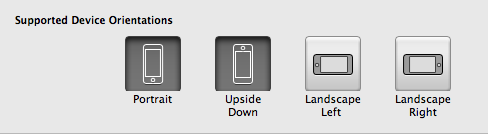
可惜,这个设置仅仅是在plist中存储了相关设置,真正要控制某个UIView的设备翻转支持,你还得在相关的UIViewController中折腾-shouldAutorotateToInterfaceOrientation:函数,根据不同的设备持有方向,来返回YES或NO。
这个code snippet简化了相关操作,通过它你可以直接在shouldAutorotateToInterfaceOrientation:函数中查询plist的相关设置,根据设置来进行返回,而不用手工代码来进行一一判断。
<div class="cnblogs_code">static inline NSString * NSStringFromUIInterfaceOriention(UIInterfaceOrientation orientation){ switch (orientation) { case UIInterfaceOrientationPortrait: return @"UIInterfaceOrientationPortrait"; case UIInterfaceOrientationPortraitUpsideDown: return @"UIInterfaceOrientationPortraitUpsideDown"; case UIInterfaceOrientationLandscapeLeft: return @"UIInterfaceOrientationLandscapeLeft"; case UIInterfaceOrientationLandscapeRight: return @"UIInterfaceOrientationLandscapeRight"; default: return @"Unexpected"; }}static inline BOOL UIInterfaceOrientationIsSupportedOrientation(UIInterfaceOrientation interfaceOrientation){ NSArray *array = [[NSBundle mainBundle] objectForInfoDictionaryKey:@"UISupportedInterfaceOrientations"]; NSUInteger index = [array indexOfObject:NSStringFromUIInterfaceOriention(interfaceOrientation)]; return index != NSNotFound;} |
|
 京ICP备14020293号-2
本网站内容均收集于互联网,如有问题请联系QQ:389897944予以删除
京ICP备14020293号-2
本网站内容均收集于互联网,如有问题请联系QQ:389897944予以删除


 窥视卡
窥视卡 雷达卡
雷达卡


 楼主
楼主 提升卡
提升卡 置顶卡
置顶卡 沉默卡
沉默卡 喧嚣卡
喧嚣卡 变色卡
变色卡 千斤顶
千斤顶 显身卡
显身卡